
The Duplicate News Problem: Why the "Clever" Embeddings Approach Failed & the Simple Solution That Worked
I spent four hours building a vector embeddings + cosine similarity approach that ultimately failed. But a simpler, more straightforward solution actually worked.


Welcome to Part 3 of my pharma and biotech news funding tracker series. In Part 1, we covered the general flow design, the framework for tool selection, and the tools I ended up using.
In Part 2, I walked through the structure of the two Zaps, as well as some key challenges I faced and changes that I had to implement to overcome those. So if you haven’t already, check those out before joining me here.
This week, we will focus on one specific issue that I’ve encountered while developing and testing the automation: duplicate news.
While it sounds trivial at first glance (and is fairly easy for a human to spot), automatically detecting similar news articles and removing duplicates turned out to be far more difficult than I expected.
So, without further ado, let’s jump straight in!
The Duplicate Detection Challenge
As great as Google Alerts are for keeping you up to date, the two main frustrations I experienced with them during my time as a pharma consultant were:
A lot of irrelevant articles
A lot of relevant articles covering the same news
The first issue was fairly straightforward to solve. As I mentioned last week, I used a Gemini model with a detailed, structured prompt to act as an AI classifier, outputting a simple “relevant” or “irrelevant” label.
Pretty easy, right?
Duplicate detection, however, wasn’t quite as straightforward.
To determine whether a newly ingested article was a duplicate, I needed to compare it against all previously processed news items (or at least the most recent ~100). That meant fetching historical data and systematically comparing it with the current article.
As I mentioned in Part 1, Zapier doesn’t have any built-in “memory” of previous executions. To get around this, I used Google Sheets as a lightweight storage layer and retrieved multiple rows of historical data in Zap 2 before the deduplication step.
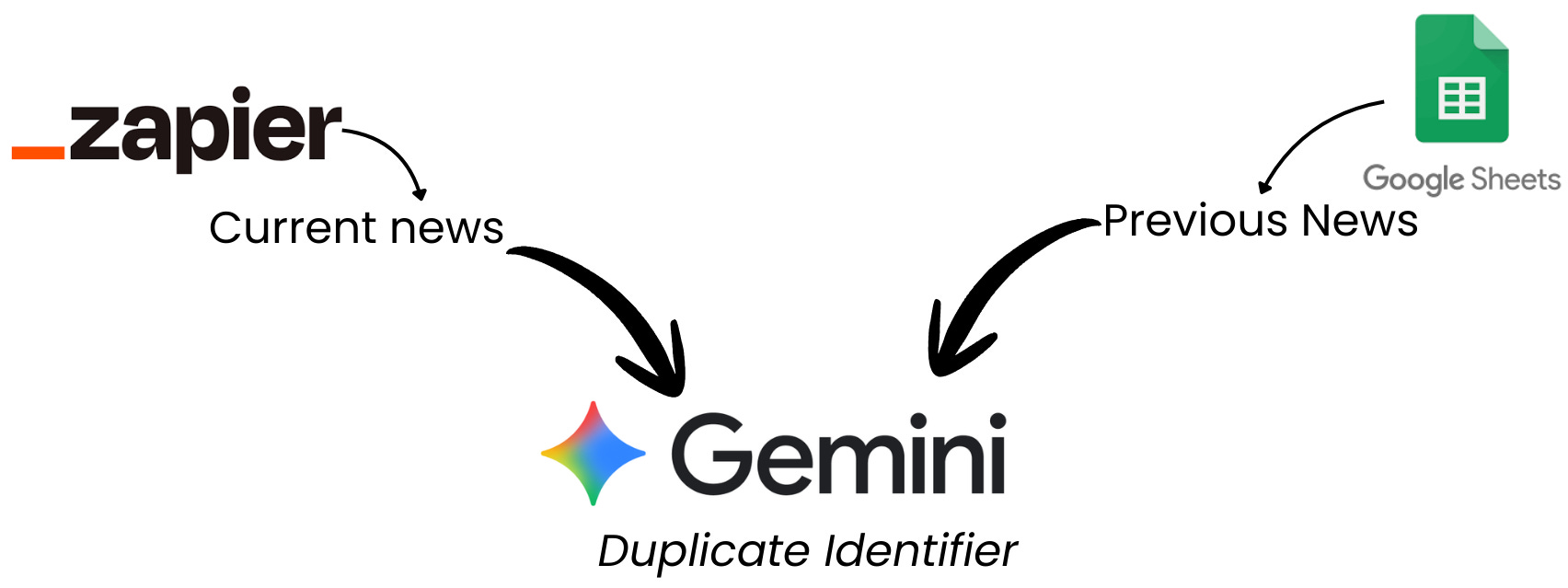
The second, and more complex, consideration was how to compare the current article with previous ones and decide whether they were describing the same underlying news in different words.
Based on advice from ChatGPT and Claude (of course 😅), I considered two options:
Using vector embeddings with cosine similarity (the “industry-standard” approach)
Using a structured prompt to ask Gemini to compare texts based on meaning (simpler, and similar to my relevance classifier)
Now, I’m usually the first to say that simpler is better, especially at the start. And yet, I decided to try vector embeddings first (perhaps because it felt like the more “clever” solution).
Vector Embeddings & Cosine Similarity
Quick nerd alert 🧠:
At the request of exactly one person (my husband 🤣), this section goes a bit deeper into what vector embeddings and cosine similarity actually are.
As the title hopefully makes clear, this was not the approach that worked for me here, so feel free to skip ahead if talk of vectors and angles is likely to put you to sleep.
Quick disclaimer: I’m not an expert in this area. I’ll focus on the intuition and how I planned to use this approach in my automation, not the full mathematical details.
The Concept
Vector embeddings are numerical representations of text in a multi-dimensional space that capture semantic meaning and relationships.
Words or phrases with similar meanings end up closer together in that space.
For example, if you imagine the word “sloth” as a vector in a simple two-dimensional space, “anteater” would be much closer to it than “hypotenuse”, which has nothing to do with animals or living things:
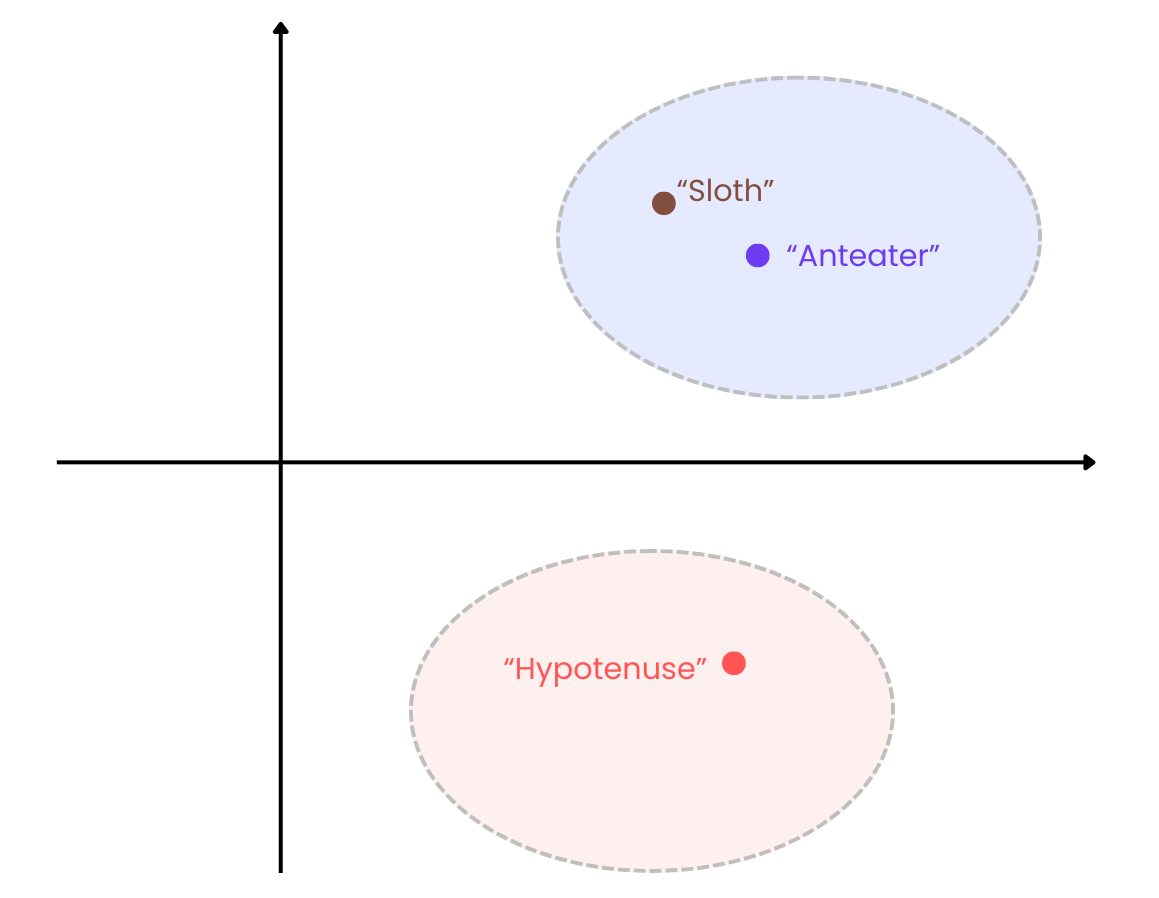
In a nutshell, this is how large language models encode and work with meaning beyond simple keyword matching.
You can extend this idea from single words to entire blocks of text by generating embeddings for whole headlines or summaries. Once you have those, you can compare them using cosine similarity:
In our sloth example, if we draw arrows from the origin to the vector coordinates, we can see that the angle between “sloth” and “anteater” (θ1) is much smaller than the angle between “sloth” and “hypotenuse” (θ2):
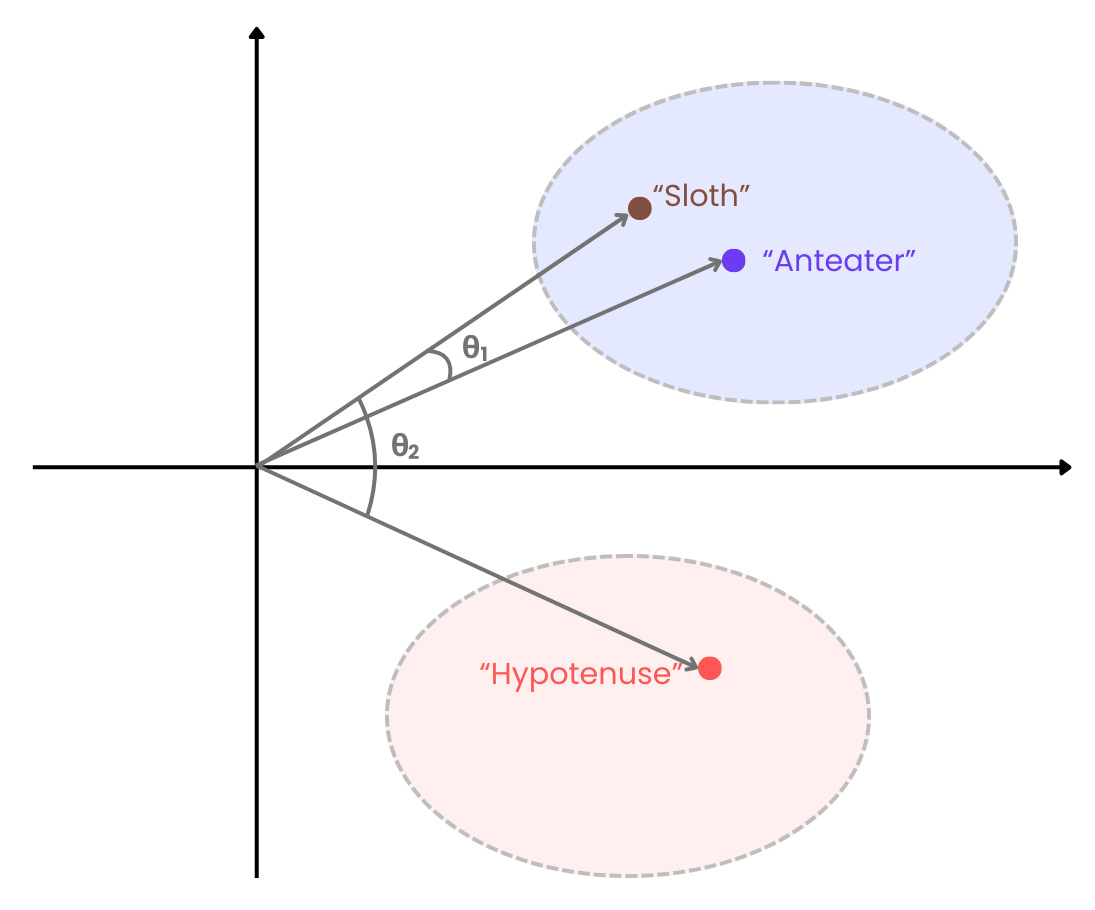
The dot product tells us how much two vectors point in the same direction, so when the vectors point in exactly the same direction (i.e., θ = 0), the dot product is exactly 1. For cosine similarity, it follows that:
Value closer to 1: Vectors point in a similar direction → similar text
Value closer to 0: Vectors are closer to being orthogonal → less related text
Value closer to -1: Vectors point in opposing directions → dissimilar text
Pretty clever, right?
Vector Embeddings in Zapier (via Jina AI)
Jina AI came to the rescue again. Using the same API key as for scraping, I was able to generate vector embeddings for each article using their embedding models and store those embeddings in an additional Google Sheets column.
The plan was then simple:
Generate embeddings for the new article
Compare them with embeddings from previous articles
Flag anything above a similarity threshold (I used 0.9) as a duplicate
This is where things started to fall apart.
Zapier doesn’t have built-in mathematical functions for cosine similarity. My first instinct was to use Code by Zapier and write a small Python script.
After ~20 minutes of wrestling with this (and realising how clunky it was getting), I decided to pivot.
In a moment of questionable judgement, I asked Gemini to calculate cosine similarity for me. The initial tests seemed fine, so I ran it on real Google Alert data.
And guess what? It didn’t work.
Almost all duplicate articles sailed straight through and landed in my final Google Sheet, a helpful reminder that Gemini is a large language model, not a reliable vector math engine. 🤦♀️
Why This Could Work (Just Not Here)
In hindsight, vector embeddings would be the more robust and scalable solution if:
I needed very high precision
I was working at a much larger scale
I had proper infrastructure (e.g., Python, vector databases, custom logic)
But in my case:
I expected some level of human review
Data lived in spreadsheets, not databases
Simplicity and speed mattered more than theoretical optimality
So despite being “clever”, this approach was a poor fit for my actual requirements (remember the Venn diagram from Part 1).
Text Comparison with AI: The Solution That Worked
After making an absolute dog’s dinner of the embeddings approach, I tried something much simpler.
I fed Gemini:
The company name
The news headline
The summary
A structured prompt asking whether the new item described the same underlying news as previous entries
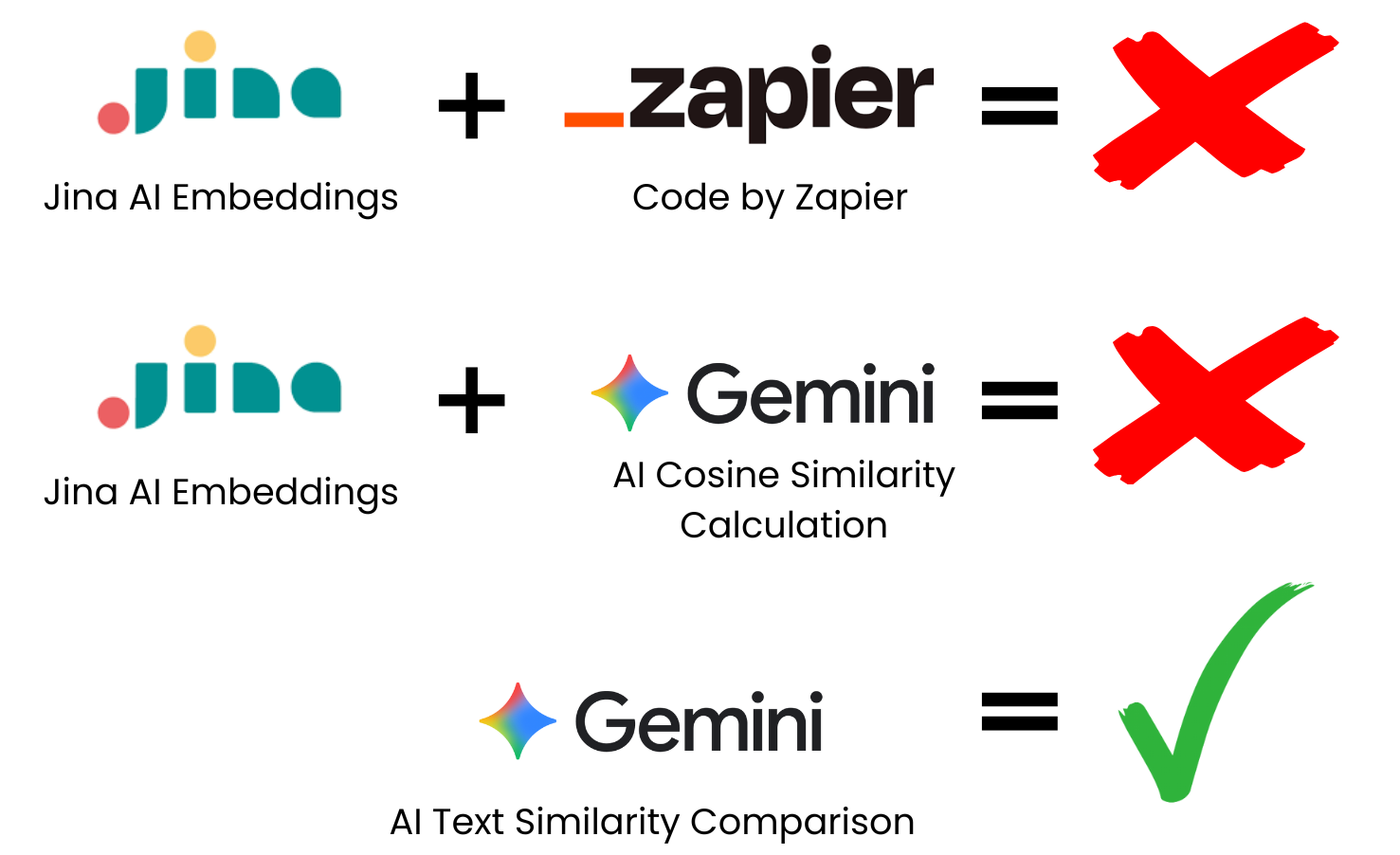
And it actually worked surprisingly well!
Out of 83 relevant news items picked up during testing, only four duplicates slipped through (~5%). Those were easy to spot and remove during review, which was well within my acceptable quality threshold.
Quick note: I did notice some inconsistencies early on. My initial prompt occasionally misclassified genuinely new articles as duplicates. I had to tweak the prompt (and others in the workflow) during testing to improve results.
As always, output quality depends heavily on both the model and the prompt.
Ideas for Improvements & Variations
Before we park this workflow for now, I wanted to share a few ideas you could explore if you decide to build something similar yourself
Here are some variations you can try out:
n8n instead of Zapier: If Zapier pricing is a concern, n8n’s free community edition offers more flexibility (loops, internal memory, etc.). I’m currently testing a version of this flow in n8n myself.
Apify instead of Jina AI: Following last week’s issue, Apify suggested batching requests to work around memory limitations. If that works, it could produce cleaner outputs and handle more complex sites.
Notion or Airtable instead of Google Sheets: For larger or longer-term databases, proper databases are a better fit and integrate well with Zapier.
Other LLMs instead of Gemini: I chose Gemini mainly because it was free in Zapier. More advanced models may deliver better results with less prompt tuning.
Keyword pre-filtering: For narrower use cases, adding a simple keyword filter before AI relevance checks can significantly reduce noise and costs.
RSS Feeds instead of Google Alerts: If you’re tracking specific companies or sources, RSS feeds may be more targeted and efficient.
There are countless other variations you could explore, but above all:
Make it fit your needs and constraints.
That matters far more than using the “best” or most sophisticated technique.
Next week, we’ll tackle the most important question of the series:
Was it actually worth it?
In Part 4, I’ll break down the actual results, time savings, ROI, and cost comparison between automation and manual work.
I've been waiting to crunch these numbers myself!
If you want to follow along (and learn what actually works in AI automation), subscribe below and share with friends and colleagues who might enjoy this experiment.
And if you have automation challenges you’d like to see me tackle, reply to this email, drop a comment, or join my subscriber chat and let me know.

Follow me on LinkedIn, where I’m also posting interesting and fun tidbits.
Insightful, it’s so true how difficult semantic deduplication gets, especially when "clever" embedding approaches often oversimplify true context.